
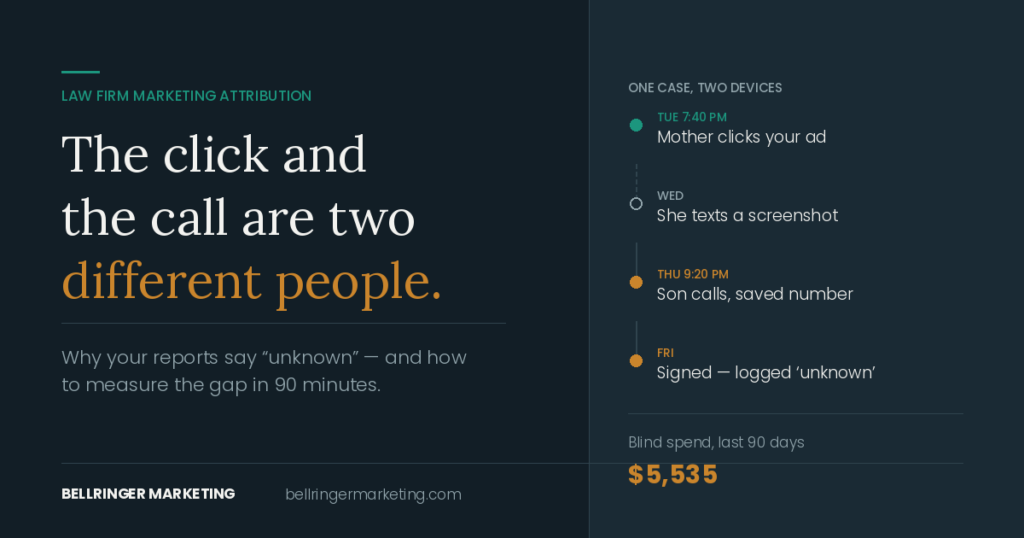
If your Google Ads account only knows about calls and form fills, it will spend your budget finding more calls and form fills. It has no idea which of them became a $1,500 misdemeanor, which became a $15,000 felony, and which never signed at all. Closing that loop, so Google learns which clicks became signed cases and what they were worth, is the single highest-leverage change a criminal defense firm can make to its ads.
This is the setup I used for Amari Law Firm in Birmingham, Alabama: CallRail for calls, Clio for matters, and Google Ads offline conversions for signed cases. It’s written for firm owners and office managers, not developers.
What “closed-loop attribution” means for a defense firm
Every click on your ad carries a unique ID from Google called a GCLID. If you keep that ID attached to the lead all the way to the signed matter, you can tell Google: this click became a client, and the fee was $X. Google then bids more for searches and people that look like your signed clients.
| Step | Tool | What it does |
|---|---|---|
| 1. Click | Google Ads (auto-tagging on) | Adds a GCLID to the landing page URL |
| 2. Call or form | CallRail | Captures the GCLID, keyword, campaign and landing page with each call and form |
| 3. Matter opened | Clio Grow / Manage | Records the new client, with lead source and fee |
| 4. Match | Zapier + a spreadsheet, or a manual weekly match | Connects the signed matter to the original call by phone or email |
| 5. Upload | Google Ads offline conversions | Sends “Signed Case” with the fee back to Google |
Step 1: Turn on auto-tagging and dynamic call tracking
In Google Ads, make sure auto-tagging is on so every click gets a GCLID. In CallRail, use a dynamic number pool on your website so each visitor sees a unique number, which lets CallRail tie the call to that visitor’s click, keyword and landing page. Use separate tracking numbers for Local Services Ads, your Google Business Profile and any directories, so every source is labeled.
Step 2: Decide what counts at each stage
Before any automation, agree on labels. In the Birmingham firm, intake used five statuses:
- Hired: signed and paid, with a fee.
- Qualified: a charge the firm handles, in its area.
- Opportunity: consultation booked or quoted, not yet signed.
- Referred Out: a real case the firm sent elsewhere.
- Bad Lead: spam, wrong number, wrong state, or someone looking for another firm.
These labels let you see where leads drop off, not just how many come in.
Step 3: Require lead source and fee in Clio
This is the step that decides whether the system works. In the Birmingham account, the tools were never the bottleneck. Fee and lead source fields left blank at intake were. A matter with no fee can’t tell Google what the case was worth. A matter with no phone number or email can’t be matched to a call at all. A free criminal defense intake form and phone script covers the questions to ask.
- Make lead source a required field when a matter is created.
- Enter the fee when the client signs, not later.
- Always record the client’s phone number and email.
- Check weekly for matters missing these fields, and fix them while people still remember.
Step 4: Create a “Signed Case” conversion in Google Ads
- In Google Ads, go to Goals → Conversions and create a new conversion action for imported conversions from clicks.
- Name it something clear, like “Signed Case,” and set its category to converted lead.
- Choose “use different values for each conversion” so each case carries its own fee.
- Make it a primary conversion only when you’re ready to bid on it (see step 6).
Step 5: Match signed matters to calls and upload them
You can automate this with Zapier, or do it by hand once a week. The Birmingham setup used both: Zapier wrote calls, forms and new Clio matters into one attribution workbook, matters were matched to leads by phone, email and intake notes, and a Google Sheets tab was uploaded to Google Ads on a daily schedule.
Each upload row needs the GCLID, the conversion name, the date and time the case signed, the fee, and the currency. Google only accepts clicks from roughly the last 90 days, so upload regularly. Adding hashed email and phone (enhanced conversions for leads) helps Google match conversions when a GCLID is missing.
A manual weekly match works fine for most single-office firms. What matters is consistency: every signed case from an ad gets uploaded, with its fee.
Step 6: Switch bidding to case value, carefully
Once signed cases are flowing in reliably, you can tell Google to bid for value: for example, to target a set return instead of a set cost per lead. Google needs volume to learn. In my experience that means roughly 15 to 30 signed cases a month. Below that, keep signed cases as a reporting metric and keep bidding on qualified calls.
Remember that signed cases lag clicks by one to three months. Judge the switch on months that have matured. Also watch for Google platform changes during a test: in August 2026 a Smart Bidding change confounded a bid strategy test in the Birmingham account, so the result wasn’t used.
What is offline conversion tracking for legal leads?
Offline conversion tracking means telling Google Ads about results that happen after the click and away from your website: a consultation held, a retainer signed, a fee paid. Google can see a call or a form. It can’t see your case management system, so you upload those outcomes yourself, matched to the original click by its Google Click ID (GCLID) or, with enhanced conversions for leads, by a hashed email address or phone number.
For criminal defense, this is the step that matters most. One Birmingham account reported plenty of DUI conversions and had never signed a DUI case from them, and without offline conversions Google kept buying more of those calls. The steps above show how to set it up with CallRail and Clio. If your basic call and form tracking isn’t working yet, start with how to set up and fix Google Ads conversion tracking for a law firm.
Marketing attribution models for law firms, in plain terms
| Model | Gives credit to | Good for |
|---|---|---|
| First touch | The first ad or page that brought the person in | Seeing which channels start new cases |
| Last touch | The last thing they clicked before calling | Simple reporting; Google Ads’ default view of a click |
| Linear / position-based | Every touch, or mostly the first and last | Firms with long research periods |
| Data-driven | Whatever Google’s model thinks mattered | Large accounts with lots of conversions |
For a criminal defense firm, the model matters less than people think. Most defense clients search, call and hire within a day or two, so first and last touch are usually the same click. What matters is connecting that click to the signed case and the fee, which is what the steps above do.
What GA4 can and can’t tell a law firm
Google Analytics 4 is useful for seeing which pages get traffic, where visitors come from and which pages lead to calls and forms. It can’t tell you which callers signed or what they paid, because that happens on the phone and in your case management system. Use GA4 for website behavior and Google Ads conversion tracking plus your case management system for cases and fees.
The four fields every lead record needs
- Source: Google Ads, Local Services Ads, organic, referral, directory.
- Campaign and keyword (from call tracking), so you can compare charges.
- Google click ID (GCLID), so a signed case can be sent back to Google Ads.
- Signed fee, entered when the client retains, not when the quote is given.
With those four fields filled in, you can answer the only question that matters: what did each campaign cost per signed case, and what did those cases pay?
What you’ll see once it works
- Cost per signed case and fees by campaign, keyword and charge.
- Campaigns that look good on conversions but never sign. In Birmingham, the DUI campaign had zero signed cases in its history.
- Keywords that return 4× next to keywords that return 2×.
- Which months were made by one or two big felony matters.
See what this data revealed in the cost per signed case breakdown.
What is marketing attribution for a law firm?
Working out which marketing brought in each client. For a defense firm that means connecting each signed case and its fee back to the call, click, campaign and keyword that produced it.
How do I track which Google Ads clicks become signed cases?
Use auto-tagging and call tracking to capture the click ID and keyword for each call or form, record lead source and fee in your case management system, and upload signed matters to Google Ads as an offline “Signed Case” conversion.
Can I use GA4 to track law firm leads?
GA4 shows website traffic and which pages lead to calls and forms, but it can’t see which callers signed or what they paid. Use it alongside call tracking and your case management system.
Which attribution model should a criminal defense firm use?
For most defense firms, first and last touch are the same because clients search and hire within a day or two. Focus on connecting the click to the signed fee rather than choosing a model.
Does CallRail integrate with Clio?
CallRail can pass call details and source data into intake and case management workflows, including Clio, directly or through tools like Zapier. The key is making sure lead source, click ID and signed fee end up on the matter.
Get a straight answer on your account
Want help connecting your calls to signed cases? Book a free 30-minute account review. I’ll look at your search terms, your call recordings and what you signed last quarter, and tell you where the money is leaking, whether you hire me or not. I work with one criminal defense firm per city and 12 firms at most.
Or call Henry directly at 612-203-3591. See pricing or the full Amari Law Firm results.
Henry Bell runs Bellringer Marketing, a Google Ads practice that works only with criminal defense firms. He managed paid search and Local Services Ads for Amari Law Firm in Birmingham, Alabama, from September 2025 to August 2026, reporting results in signed cases from the firm’s case management system.