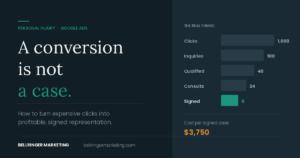

Your Google Ads dashboard says the campaigns are working. Clicks are up. “Conversions” are up. The phone rings.
But the calls are wrong. Price shoppers asking about payment plans before they say hello. People who thought they were calling a different firm. Cases you don’t take and have to refer out. Your intake staff is busy, your ad budget is spent, and your signed-case count didn’t move.
Here’s the part nobody tells you: your account isn’t broken. It’s doing exactly what it was trained to do. And until the training changes, more budget just buys you more of the same calls, faster.
The short answer
When a law firm’s Google Ads aren’t converting into signed cases, the cause is almost never the ad copy. It’s that Google is being told a phone call is the goal. Every conversion you report counts as one — the $10,000 felony retainer and the price shopper are identical to the algorithm — so the bidding system optimizes toward whichever is cheaper to find. That’s usually the price shopper.
The fix is to send signed cases and their fee values back into Google Ads, so the algorithm optimizes toward revenue instead of ringing phones. That’s a tracking system, not a copywriting problem.
First — make sure this is your problem
“Not converting” describes three different failures with three different fixes. Find yours before you read further:
Ads get impressions but few clicks → position, relevance, or delivery. Different article.
Clicks come in but nobody calls or fills the form → landing page problem. Fix the page before you touch the account.
Calls and forms come in but they don’t become cases → you’re in the right place. Keep reading.
Google only learns what you teach it
Google’s bidding system optimizes toward whatever you’ve defined as a “conversion.” For most law firms, that’s a form fill or a phone call over 60 seconds.
The problem: to Google, every one of those conversions is identical. The caller who retains you on a $10,000 felony case and the caller asking if you do free consultations each count as one conversion. Same value — one.
So when the algorithm goes hunting for more conversions, it brings you more of both. And if price shoppers are cheaper to find, which they usually are, it drifts toward them, because it’s hitting its cost-per-conversion target. It’s doing its job. It was just given the wrong job.
This is why the standard agency fixes — new ad copy, new landing page, more negative keywords — help but never quite solve it. They treat symptoms while the algorithm keeps steering toward the wrong destination.
Bad leads come in types — diagnose before you fix
“Bad leads” isn’t one problem. In every law firm account I’ve worked on, the dead leads sort into a few distinct types, and each type traces back to a different cause in the account.
| Lead type | What it usually traces back to | The fix |
|---|---|---|
| Cost-concern callers Can’t afford your retainer |
Generic, high-volume search terms and ad copy that doesn’t signal what kind of firm you are. Someone searching “gun charge lawyer” or “second DUI attorney” is in a different mindset than someone searching “criminal lawyer.” | Shift budget toward charge-specific terms; qualify in the ad copy |
| Wrong-firm callers Thought they dialed someone else |
Your ads showing on searches for competitor firm names through Google’s close-variant matching. | Competitor names as negatives. Fixable in an afternoon once you can see it. |
| Referred-out callers Outside your practice or county |
Specific query patterns your keywords are accidentally catching, or location settings letting in the wrong geography. | Query-level negatives; location targeting set to Presence only |
| Ghosted leads Never responded after first contact |
Often not an ads problem at all — a follow-up speed or intake process problem wearing an ads costume. | Measure time-to-first-callback before blaming the account |
Here’s the catch: you can’t fix what you can’t see. Which type is costing you the most? Which search terms produce each type? Most firms — and most agencies — genuinely don’t know, because nobody is recording why each dead lead died.
The intake tagging system that makes this visible
Before any of the technical work below matters, one thing has to happen at the front desk: every lead that doesn’t sign gets a reason attached to it. Not a note in a field nobody reads — a single required dropdown with a short, fixed list.
The list I use with firms, and the reason for each:
- Signed — with the actual fee recorded, not an estimate
- Cost — couldn’t afford
- Wrong firm — meant to call someone else
- Outside practice area
- Outside service area
- Conflict
- Retained elsewhere — shopped and chose a competitor
- Ghosted — no response after initial contact
- Spam or wrong number
Keep it to under ten options and make it mandatory to close a record. Long lists get ignored; optional fields get skipped. If intake can’t complete it in two seconds, it won’t get completed at all.
Thirty days of this turns “our leads are bad” into a ranked list of exactly which search terms produce which failure. That alone, before you build a single automation, is usually worth more than a quarter of ad optimization.
The four-layer tracking architecture
The method is called offline conversion tracking. In plain terms: instead of only telling Google “someone called,” you tell Google “this specific caller signed a retainer, and the case was worth this much” — and “this caller didn’t, and here’s why.”
Layer 1 — Call tracking
Every call and form fill is matched to the exact ad click that produced it, down to the keyword. This is the layer that makes everything else possible. Without it, you have a phone log and a spend report with no bridge between them.
Layer 2 — Google Tag Manager
When someone clicks your ad, Google attaches a unique click ID. Tag Manager captures it and stores it with the lead’s record, so the connection survives past the website visit. This is the piece that most commonly breaks silently after a website redesign.
Layer 3 — Your intake CRM as source of truth
Every lead moves through your pipeline. When a case signs, the real fee gets recorded. When a lead dies, intake tags the reason using the list above. The CRM, not the ads dashboard, becomes the system of record.
Layer 4 — Automation closing the loop
When a case is marked signed in the CRM, an automation sends that outcome — with its dollar value — back into Google Ads, matched to the original click. No spreadsheets, no month-end uploads, no one remembering to do it.
Once this runs, the question changes from “which keywords get calls?” to “which keywords sign cases?” Those are different answers more often than you’d expect — and only the second one pays your rent. I’ve written a full technical walkthrough of building this pipeline if you want the implementation detail.
The 90-day window nobody warns law firms about
This is the detail that quietly breaks offline conversion tracking at law firms specifically, and I almost never see it mentioned.
Google’s offline conversion import has a time limit on how old a click can be when you upload its outcome — currently around 90 days. Miss the window and the conversion is rejected. The click ID still exists in your CRM, the case still signed, but Google never learns about it.
For most businesses this is irrelevant. For law firms it’s a live risk. Criminal and family matters routinely take 30 to 60 days from first click to signed retainer. Personal injury can take considerably longer. A case that takes four months to sign — which is normal — falls outside the window entirely, and your highest-value cases are frequently your slowest ones. That means the exact outcomes you most want Google to learn from are the ones most likely to be silently discarded.
How to work around it:
- Upload at the retainer signed stage, not case resolution. The signature is the conversion, not the settlement.
- Add an intermediate conversion for consultation booked or consultation attended, which happens well inside the window and gives the algorithm a faster signal to learn from.
- Run uploads on a continuous automation rather than monthly batches, so nothing ages out waiting for someone to run a report.
- Track your upload rejection rate. If a meaningful share of conversions are failing to import, that’s the first thing to check — and almost nobody checks it.
Verify the current limit in Google’s documentation before you build around it — these windows have changed before and will change again.
Bar compliance: what changes for legal accounts
Most articles about law firm Google Ads are written by people who’ve never had to think about attorney advertising rules. The advice they give — put case results with dollar amounts in your ad copy, add client testimonials, call yourself the best in the state — ranges from “needs a disclaimer” to “don’t.”
Rules vary meaningfully by state, so treat this as a list of things to check with your own bar rather than guidance to act on:
- Past results. Many states require a disclaimer along the lines of prior results not guaranteeing a similar outcome. That’s hard to fit in a Google Ads headline and easier to place on the landing page — which is an argument for keeping results claims off the ad and on the page.
- Specialization language. “Specialist” and “expert” are restricted in many jurisdictions unless you hold a recognized certification. “Focused on” and “practice limited to” are usually safer constructions.
- Superlatives. “Best,” “top,” and “#1” invite scrutiny under rules against false or misleading communications, and they’re weak ad copy anyway compared to something specific.
- Testimonials. Restricted or disclaimer-dependent in a number of states.
- Record retention. Some states require you to keep copies of advertisements for a set period. Responsive search ads assemble combinations dynamically, which makes “what did the ad say” a harder question than it used to be. Export your assets periodically.
- Remarketing. Google’s personalized advertising policies restrict targeting around sensitive categories, and legal status and criminal history sit squarely in that territory. Defense firms in particular should confirm current policy before building audience lists — an approach that’s fine for a fence contractor may not be permitted here.
None of this is legal advice, and I’m not your lawyer — you are. But an agency that’s never raised any of it with you probably hasn’t run many legal accounts.
Want this built without becoming your own data engineer?
This is what I do at Bellringer Marketing — the full pipeline: call tracking, tag setup, CRM integration, the automation feeding outcomes back to Google, and the campaign management it powers. If your ads produce calls but not cases, talk to me directly.
What changes when the loop is closed
Your reports finally tell the truth. Not cost per lead — revenue returned per dollar spent, by campaign and keyword. Most firms discover a meaningful share of budget is going to keywords that produce calls but have never produced a signed case.
Bad leads become diagnosable. With disqualification reasons tagged, the patterns surface in weeks. Price shoppers cluster on certain terms. Wrong-firm calls trace to specific queries. Each pattern points to a specific, evidence-based fix instead of a guess.
Budget follows revenue. When outcome data is attached to keywords, budget reallocation stops being a debate and becomes arithmetic.
Google’s targeting improves over time. Fed real case outcomes instead of raw call counts, the algorithm’s picture of your best client sharpens. With enough volume, you can graduate to value-based bidding, where Google actively bids more for searchers who resemble your highest-value cases.
One caveat on that last point: value-based bidding needs conversion volume to work. Below roughly 30 to 50 conversions a month, the algorithm doesn’t have enough signal to act on value data meaningfully. Send the values anyway — but don’t switch bid strategies until the volume supports it. You can see what this looked like on a criminal defense account and on a personal injury account.
An honest word about timelines
This is not an overnight fix, and anyone promising one is selling something. Criminal and family law cases often take 30 to 60 days from first click to signed retainer, so improvements made today show up in next month’s numbers and the month after. Algorithms also need a few weeks to adjust when their target changes.
The firms that win are the ones that build the system, feed it consistently — every signed case with its fee, every dead lead with its reason — and give it time to compound. The ones that don’t are still staring at dashboards full of “conversions” that never became deposits.
Frequently asked questions
Why are my law firm’s Google Ads getting calls but no cases?
Because Google is optimizing toward calls, which is exactly what you told it to do. Every conversion counts as one regardless of value, so the bidding system drifts toward whichever callers are cheapest to acquire — usually price shoppers. Until signed cases and their fee values are sent back into the account, more budget just produces more of the same calls.
What is offline conversion tracking for law firms?
It’s the process of sending case outcomes from your intake CRM back into Google Ads, matched to the original ad click. Instead of Google knowing only that a call happened, it learns which clicks produced signed retainers and what each was worth. That lets the bidding system optimize toward revenue rather than call volume.
Why do I keep getting calls from people who wanted a different firm?
Almost always because your ads are showing on searches for competitor firm names through Google’s close-variant matching. Pull your search terms report and look for competitor names. Adding them as negative keywords fixes it in an afternoon — but you have to be able to see the problem first, which is why search term visibility and lead tagging matter.
How long does it take to fix a law firm Google Ads account?
Expect two to three months before the numbers reflect the change. Legal matters commonly take 30 to 60 days from first click to signed retainer, so today’s improvements appear in next month’s results at the earliest. Automated bidding also needs a few weeks to adjust after its target changes. Firms that judge the work at week three are measuring noise.
Can I upload case outcomes to Google Ads months after the click?
Only within Google’s import window, currently around 90 days from the click. This matters more for law firms than for most businesses, because slow-signing cases are often the highest-value ones. Upload at the retainer-signed stage rather than case resolution, add an earlier consultation-booked conversion so the algorithm gets a faster signal, and run uploads continuously rather than in monthly batches.
Do bar advertising rules affect Google Ads copy?
Yes, and requirements vary by state. Common areas to check with your own bar include disclaimers on past results, restrictions on “specialist” and “expert” language absent a recognized certification, limits on superlatives and testimonials, and advertisement record-retention requirements — which responsive search ads complicate, since combinations are assembled dynamically. Google’s own policies around sensitive categories also constrain remarketing for legal services.
Start with one question
Of the leads your ads produced last month, how many signed — and can you prove which keyword each one came from?
If you can’t answer that, your account is flying blind no matter what the dashboard says. Fixing that visibility is step one. Everything else builds on it.
About the author
Henry Bell runs Bellringer Marketing, managing Google Ads for law firms with one metric in mind: revenue returned per dollar spent. He builds the call tracking, tag, CRM, and automation pipelines that connect signed cases back to the clicks that produced them.
Related reading
- Marketing attribution: the leads your reports can’t see — the technical build behind this article
- Criminal defense case study — what closing the loop produced
- Personal injury PPC case study
- When your ads aren’t getting clicks at all — the failure mode before this one
- What Google Ads management costs
Your Google Ads dashboard says the campaigns are working. Clicks are up. “Conversions” are up. The phone rings.
But the calls are wrong. Price shoppers asking about payment plans before they say hello. People who thought they were calling a different firm. Cases you don’t take and have to refer out. Your intake staff is busy, your ad budget is spent, and your signed-case count didn’t move.
Here’s the part nobody tells you: your account isn’t broken. It’s doing exactly what it was trained to do. And until the training changes, more budget just buys you more of the same calls, faster.
The short answer
When a law firm’s Google Ads aren’t converting into signed cases, the cause is almost never the ad copy. It’s that Google is being told a phone call is the goal. Every conversion you report counts as one — the $10,000 felony retainer and the price shopper are identical to the algorithm — so the bidding system optimizes toward whichever is cheaper to find. That’s usually the price shopper.
The fix is to send signed cases and their fee values back into Google Ads, so the algorithm optimizes toward revenue instead of ringing phones. That’s a tracking system, not a copywriting problem.
First — make sure this is your problem
“Not converting” describes three different failures with three different fixes. Find yours before you read further:
Ads get impressions but few clicks → position, relevance, or delivery. Different article.
Clicks come in but nobody calls or fills the form → landing page problem. Fix the page before you touch the account.
Calls and forms come in but they don’t become cases → you’re in the right place. Keep reading.
Google only learns what you teach it
Google’s bidding system optimizes toward whatever you’ve defined as a “conversion.” For most law firms, that’s a form fill or a phone call over 60 seconds.
The problem: to Google, every one of those conversions is identical. The caller who retains you on a $10,000 felony case and the caller asking if you do free consultations each count as one conversion. Same value — one.
So when the algorithm goes hunting for more conversions, it brings you more of both. And if price shoppers are cheaper to find, which they usually are, it drifts toward them, because it’s hitting its cost-per-conversion target. It’s doing its job. It was just given the wrong job.
This is why the standard agency fixes — new ad copy, new landing page, more negative keywords — help but never quite solve it. They treat symptoms while the algorithm keeps steering toward the wrong destination.
Bad leads come in types — diagnose before you fix
“Bad leads” isn’t one problem. In every law firm account I’ve worked on, the dead leads sort into a few distinct types, and each type traces back to a different cause in the account.
| Lead type | What it usually traces back to | The fix |
|---|---|---|
| Cost-concern callers Can’t afford your retainer |
Generic, high-volume search terms and ad copy that doesn’t signal what kind of firm you are. Someone searching “gun charge lawyer” or “second DUI attorney” is in a different mindset than someone searching “criminal lawyer.” | Shift budget toward charge-specific terms; qualify in the ad copy |
| Wrong-firm callers Thought they dialed someone else |
Your ads showing on searches for competitor firm names through Google’s close-variant matching. | Competitor names as negatives. Fixable in an afternoon once you can see it. |
| Referred-out callers Outside your practice or county |
Specific query patterns your keywords are accidentally catching, or location settings letting in the wrong geography. | Query-level negatives; location targeting set to Presence only |
| Ghosted leads Never responded after first contact |
Often not an ads problem at all — a follow-up speed or intake process problem wearing an ads costume. | Measure time-to-first-callback before blaming the account |
Here’s the catch: you can’t fix what you can’t see. Which type is costing you the most? Which search terms produce each type? Most firms — and most agencies — genuinely don’t know, because nobody is recording why each dead lead died.
The intake tagging system that makes this visible
Before any of the technical work below matters, one thing has to happen at the front desk: every lead that doesn’t sign gets a reason attached to it. Not a note in a field nobody reads — a single required dropdown with a short, fixed list.
The list I use with firms, and the reason for each:
- Signed — with the actual fee recorded, not an estimate
- Cost — couldn’t afford
- Wrong firm — meant to call someone else
- Outside practice area
- Outside service area
- Conflict
- Retained elsewhere — shopped and chose a competitor
- Ghosted — no response after initial contact
- Spam or wrong number
Keep it to under ten options and make it mandatory to close a record. Long lists get ignored; optional fields get skipped. If intake can’t complete it in two seconds, it won’t get completed at all.
Thirty days of this turns “our leads are bad” into a ranked list of exactly which search terms produce which failure. That alone, before you build a single automation, is usually worth more than a quarter of ad optimization.
The four-layer tracking architecture
The method is called offline conversion tracking. In plain terms: instead of only telling Google “someone called,” you tell Google “this specific caller signed a retainer, and the case was worth this much” — and “this caller didn’t, and here’s why.”
Layer 1 — Call tracking
Every call and form fill is matched to the exact ad click that produced it, down to the keyword. This is the layer that makes everything else possible. Without it, you have a phone log and a spend report with no bridge between them.
Layer 2 — Google Tag Manager
When someone clicks your ad, Google attaches a unique click ID. Tag Manager captures it and stores it with the lead’s record, so the connection survives past the website visit. This is the piece that most commonly breaks silently after a website redesign.
Layer 3 — Your intake CRM as source of truth
Every lead moves through your pipeline. When a case signs, the real fee gets recorded. When a lead dies, intake tags the reason using the list above. The CRM, not the ads dashboard, becomes the system of record.
Layer 4 — Automation closing the loop
When a case is marked signed in the CRM, an automation sends that outcome — with its dollar value — back into Google Ads, matched to the original click. No spreadsheets, no month-end uploads, no one remembering to do it.
Once this runs, the question changes from “which keywords get calls?” to “which keywords sign cases?” Those are different answers more often than you’d expect — and only the second one pays your rent. I’ve written a full technical walkthrough of building this pipeline if you want the implementation detail.
The 90-day window nobody warns law firms about
This is the detail that quietly breaks offline conversion tracking at law firms specifically, and I almost never see it mentioned.
Google’s offline conversion import has a time limit on how old a click can be when you upload its outcome — currently around 90 days. Miss the window and the conversion is rejected. The click ID still exists in your CRM, the case still signed, but Google never learns about it.
For most businesses this is irrelevant. For law firms it’s a live risk. Criminal and family matters routinely take 30 to 60 days from first click to signed retainer. Personal injury can take considerably longer. A case that takes four months to sign — which is normal — falls outside the window entirely, and your highest-value cases are frequently your slowest ones. That means the exact outcomes you most want Google to learn from are the ones most likely to be silently discarded.
How to work around it:
- Upload at the retainer signed stage, not case resolution. The signature is the conversion, not the settlement.
- Add an intermediate conversion for consultation booked or consultation attended, which happens well inside the window and gives the algorithm a faster signal to learn from.
- Run uploads on a continuous automation rather than monthly batches, so nothing ages out waiting for someone to run a report.
- Track your upload rejection rate. If a meaningful share of conversions are failing to import, that’s the first thing to check — and almost nobody checks it.
Verify the current limit in Google’s documentation before you build around it — these windows have changed before and will change again.
Bar compliance: what changes for legal accounts
Most articles about law firm Google Ads are written by people who’ve never had to think about attorney advertising rules. The advice they give — put case results with dollar amounts in your ad copy, add client testimonials, call yourself the best in the state — ranges from “needs a disclaimer” to “don’t.”
Rules vary meaningfully by state, so treat this as a list of things to check with your own bar rather than guidance to act on:
- Past results. Many states require a disclaimer along the lines of prior results not guaranteeing a similar outcome. That’s hard to fit in a Google Ads headline and easier to place on the landing page — which is an argument for keeping results claims off the ad and on the page.
- Specialization language. “Specialist” and “expert” are restricted in many jurisdictions unless you hold a recognized certification. “Focused on” and “practice limited to” are usually safer constructions.
- Superlatives. “Best,” “top,” and “#1” invite scrutiny under rules against false or misleading communications, and they’re weak ad copy anyway compared to something specific.
- Testimonials. Restricted or disclaimer-dependent in a number of states.
- Record retention. Some states require you to keep copies of advertisements for a set period. Responsive search ads assemble combinations dynamically, which makes “what did the ad say” a harder question than it used to be. Export your assets periodically.
- Remarketing. Google’s personalized advertising policies restrict targeting around sensitive categories, and legal status and criminal history sit squarely in that territory. Defense firms in particular should confirm current policy before building audience lists — an approach that’s fine for a fence contractor may not be permitted here.
None of this is legal advice, and I’m not your lawyer — you are. But an agency that’s never raised any of it with you probably hasn’t run many legal accounts.
Want this built without becoming your own data engineer?
This is what I do at Bellringer Marketing — the full pipeline: call tracking, tag setup, CRM integration, the automation feeding outcomes back to Google, and the campaign management it powers. If your ads produce calls but not cases, talk to me directly.
What changes when the loop is closed
Your reports finally tell the truth. Not cost per lead — revenue returned per dollar spent, by campaign and keyword. Most firms discover a meaningful share of budget is going to keywords that produce calls but have never produced a signed case.
Bad leads become diagnosable. With disqualification reasons tagged, the patterns surface in weeks. Price shoppers cluster on certain terms. Wrong-firm calls trace to specific queries. Each pattern points to a specific, evidence-based fix instead of a guess.
Budget follows revenue. When outcome data is attached to keywords, budget reallocation stops being a debate and becomes arithmetic.
Google’s targeting improves over time. Fed real case outcomes instead of raw call counts, the algorithm’s picture of your best client sharpens. With enough volume, you can graduate to value-based bidding, where Google actively bids more for searchers who resemble your highest-value cases.
One caveat on that last point: value-based bidding needs conversion volume to work. Below roughly 30 to 50 conversions a month, the algorithm doesn’t have enough signal to act on value data meaningfully. Send the values anyway — but don’t switch bid strategies until the volume supports it. You can see what this looked like on a criminal defense account and on a personal injury account.
An honest word about timelines
This is not an overnight fix, and anyone promising one is selling something. Criminal and family law cases often take 30 to 60 days from first click to signed retainer, so improvements made today show up in next month’s numbers and the month after. Algorithms also need a few weeks to adjust when their target changes.
The firms that win are the ones that build the system, feed it consistently — every signed case with its fee, every dead lead with its reason — and give it time to compound. The ones that don’t are still staring at dashboards full of “conversions” that never became deposits.
Frequently asked questions
Why are my law firm’s Google Ads getting calls but no cases?
Because Google is optimizing toward calls, which is exactly what you told it to do. Every conversion counts as one regardless of value, so the bidding system drifts toward whichever callers are cheapest to acquire — usually price shoppers. Until signed cases and their fee values are sent back into the account, more budget just produces more of the same calls.
What is offline conversion tracking for law firms?
It’s the process of sending case outcomes from your intake CRM back into Google Ads, matched to the original ad click. Instead of Google knowing only that a call happened, it learns which clicks produced signed retainers and what each was worth. That lets the bidding system optimize toward revenue rather than call volume.
Why do I keep getting calls from people who wanted a different firm?
Almost always because your ads are showing on searches for competitor firm names through Google’s close-variant matching. Pull your search terms report and look for competitor names. Adding them as negative keywords fixes it in an afternoon — but you have to be able to see the problem first, which is why search term visibility and lead tagging matter.
How long does it take to fix a law firm Google Ads account?
Expect two to three months before the numbers reflect the change. Legal matters commonly take 30 to 60 days from first click to signed retainer, so today’s improvements appear in next month’s results at the earliest. Automated bidding also needs a few weeks to adjust after its target changes. Firms that judge the work at week three are measuring noise.
Can I upload case outcomes to Google Ads months after the click?
Only within Google’s import window, currently around 90 days from the click. This matters more for law firms than for most businesses, because slow-signing cases are often the highest-value ones. Upload at the retainer-signed stage rather than case resolution, add an earlier consultation-booked conversion so the algorithm gets a faster signal, and run uploads continuously rather than in monthly batches.
Do bar advertising rules affect Google Ads copy?
Yes, and requirements vary by state. Common areas to check with your own bar include disclaimers on past results, restrictions on “specialist” and “expert” language absent a recognized certification, limits on superlatives and testimonials, and advertisement record-retention requirements — which responsive search ads complicate, since combinations are assembled dynamically. Google’s own policies around sensitive categories also constrain remarketing for legal services.
Start with one question
Of the leads your ads produced last month, how many signed — and can you prove which keyword each one came from?
If you can’t answer that, your account is flying blind no matter what the dashboard says. Fixing that visibility is step one. Everything else builds on it.
About the author
Henry Bell runs Bellringer Marketing, managing Google Ads for law firms with one metric in mind: revenue returned per dollar spent. He builds the call tracking, tag, CRM, and automation pipelines that connect signed cases back to the clicks that produced them.
Related reading
- Marketing attribution: the leads your reports can’t see — the technical build behind this article
- Criminal defense case study — what closing the loop produced
- Personal injury PPC case study
- When your ads aren’t getting clicks at all — the failure mode before this one
- What Google Ads management costs